Optimise a Customer Support Desk using AI

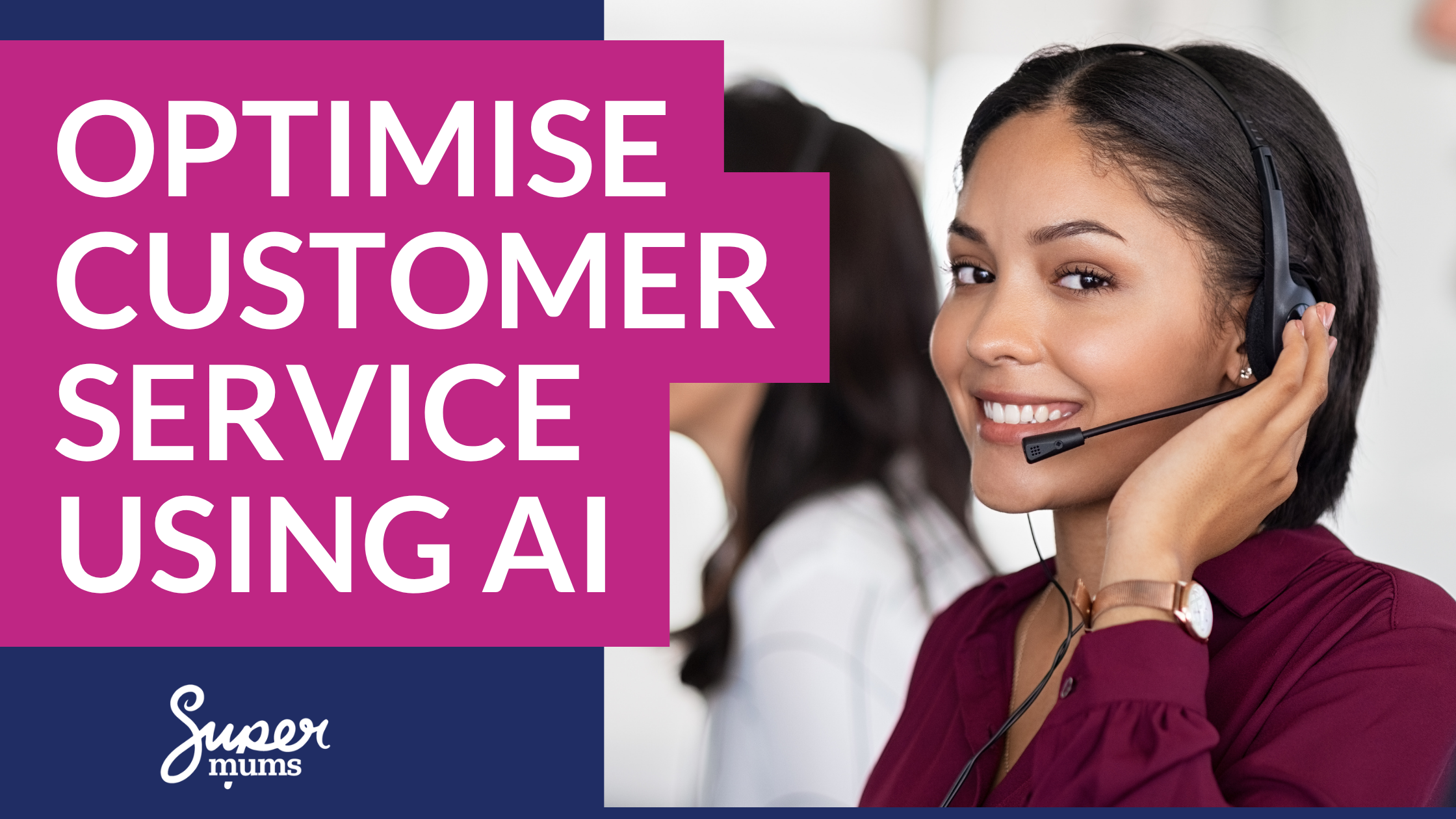
In this week’s blog we discus practical ways to optimise a customer support desk using AI to deliver faster resolutions, happier customers, and a team that isn’t running on empty.
Every support team knows the feeling. The queue is growing. The same questions keep coming in. Your best agents are spending half their day on tasks that shouldn’t need a human at all — and the cases that genuinely need their expertise are waiting.
Meanwhile, customers expect faster replies, more personalised help, and a seamless experience no matter how they get in touch. The gap between what customers expect and what most support teams can realistically deliver is getting wider.
AI can help close that gap. Not in a vague, futuristic way — in a practical, measurable way that you can start implementing now.
But here’s the catch. AI only works when it’s applied to the right problems, in the right order, with the right foundations in place. Bolting a chatbot onto a broken process won’t fix anything. It’ll just frustrate customers faster.
This blog walks through the customer support journey stage by stage and shows you where AI genuinely adds value — and where you need to do the groundwork first.
Before we get into the AI opportunities, let’s talk numbers. It’s hard to improve what you aren’t measuring — and it’s even harder to know whether your numbers are good without something to compare them to.
How Does Your Customer Support Desk Measure Up?
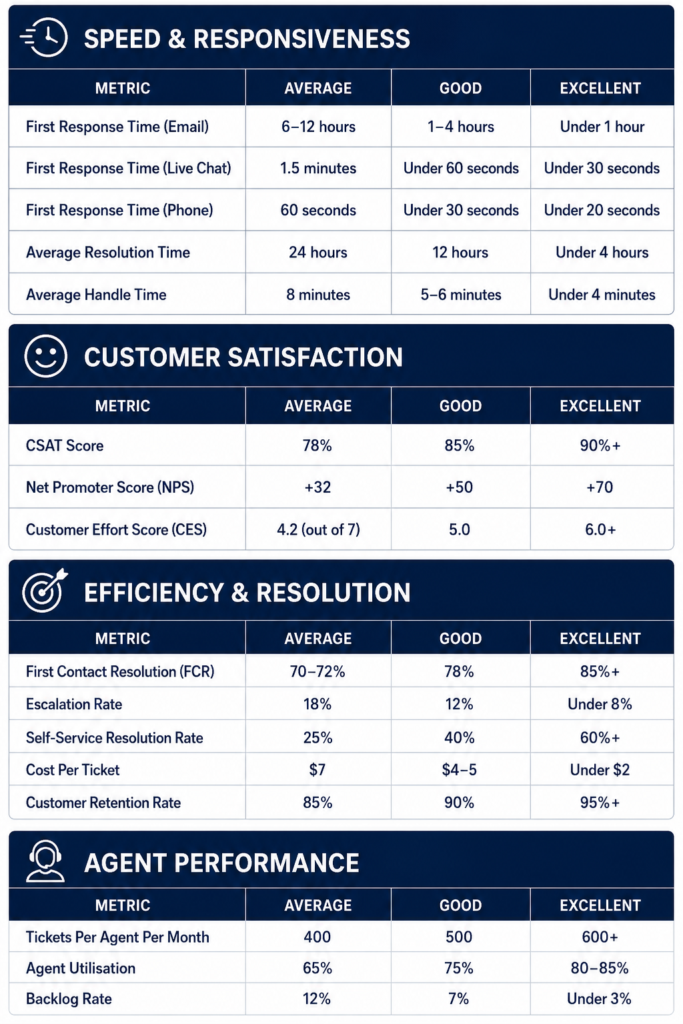
We’ve pulled together 2026 industry benchmarks across the metrics that matter most, drawn from sources including Customer Support Benchmarks (2026): Industry Standards & KPIs, 17 Support KPIs & Benchmarks for High-Performing Teams (2026), and Customer Service Metrics: 15 Key KPIs to Track in 2026.
A word of caution on benchmarks: These are cross-industry averages. A 4-hour first response time might be excellent for a small team handling complex enterprise software issues, but poor for an e-commerce company managing delivery queries. As Help Desk KPIs & Metrics: 10 Essential Benchmarks rightly points out: context matters more than raw numbers. Use these KPI’s as as a starting point for measuring your baseline and not a rigid target.
Here’s where average, good, and excellent typically sit:
Think of Your Support Desk Like a Funnel
If you work in sales or marketing, you’ll be familiar with the idea of a funnel — moving people through stages, reducing friction, and converting at each step.
Your support desk works the same way. Every customer interaction moves through a journey:
- The customer tries to help themselves
- They raise a query or case
- That case gets routed to the right person
- An agent works to resolve it
- The case is closed and followed up
- You learn from it and improve
AI can add value at every single one of these stages. Let’s break them down.
1. Self-Service: Help Customers Before They Need to Ask
KPIs this impacts: Self-Service Resolution Rate, Ticket Volume, Cost Per Ticket
This is where AI delivers the fastest, most visible wins.
The truth is, a huge proportion of the queries hitting your support team could be resolved without human involvement — if customers had the right information at the right time.
Think about the questions your team answers most often. Password resets. Order tracking. “How do I change my subscription?” “Where’s my invoice?” These are high-volume, low-complexity queries, and every one of them is a candidate for AI-powered self-service.
What to do:
- Audit your top 20 case reasons. Which ones are repetitive? Which ones have a standard answer? These are your starting point.
- Build or improve your knowledge base. AI-powered search tools can surface the most relevant article based on what the customer is actually asking — not just keyword matching, but understanding intent.
- Introduce an AI chatbot for common queries. Not the clunky, scripted kind from five years ago. Modern AI assistants can understand natural language, pull from your knowledge base, and handle multi-step queries.
- Track what happens after self-service. If customers are visiting your help centre and still raising cases, the content isn’t solving their problem. Fix the content, don’t blame the customer.
Quick Insight: Research from Gartner suggests that 70% of customers use self-service channels at some point in their resolution journey — but only 9% resolve their issue entirely through self-service. That’s a massive opportunity gap.
The goal here isn’t to block customers from reaching a human. It’s to empower them to get answers faster when they don’t need one.
2. Intelligent Routing: Get the Right Case to the Right Person, Instantly
KPIs this impacts: First Response Time, Escalation Rate, First Contact Resolution
Once a customer does raise a case, what happens next is often the most frustrating part — for everyone.
In many support teams, cases land in a general queue. Someone manually reads them, figures out what they’re about, assigns a priority, and routes them to the right team. This takes time, introduces errors, and means complex or urgent cases can sit waiting behind simple ones.
AI changes this completely.
What to do:
- Use AI-powered triage to auto-classify incoming cases. Based on the customer’s description, AI can predict the category, priority, and required skill set — and route the case automatically.
- Implement skills-based routing. Instead of sending cases to a generic queue, route them to the agent who is best qualified and currently available to handle that specific type of issue.
- Flag high-risk cases early. AI can analyse the language and tone of incoming queries to detect frustration, urgency, or potential escalation. These cases should jump the queue, not wait in it.
A note on data quality: AI classification is only as good as the data it’s trained on. If your historical case data is messy — inconsistent categories, vague descriptions, outdated labels — your AI will inherit those problems. Clean your data first. It’s not the exciting bit, but it’s the bit that makes everything else work.
3. Agent Assist: Make Your Team Faster Without Replacing Them
KPIs this impacts: Average Handle Time, First Contact Resolution, CSAT, Agent Utilisation
This is the stage where AI gets really interesting — and where some teams get nervous.
Let’s be clear: the goal of AI in support is not to replace agents. It’s to remove the repetitive, time-consuming parts of their job so they can focus on what they’re actually good at — solving problems, showing empathy, and building customer relationships.
What to do:
- AI-suggested replies. Based on the case details and successful past interactions, AI can draft a response for the agent to review, edit, and send. This saves time on every single case.
- Automatic knowledge surfacing. Instead of agents searching manually for the right article or process document, AI can surface the most relevant resources right inside the case record.
- Real-time guidance. During live chat or phone interactions, AI can listen to the conversation and suggest next steps, relevant policies, or solutions — like having a knowledgeable colleague whispering in your ear.
- Conversation summarisation. After a call or chat, AI can generate a case summary automatically. This alone can save agents several minutes per interaction — and those minutes add up fast.
Quick Insight: McKinsey estimates that AI-assisted agents can handle queries up to 14% faster on average, with the biggest gains seen among newer or less experienced team members. AI doesn’t just help your best agents — it raises the floor for everyone.
One important rule: AI-generated responses should always be reviewed before they reach the customer. Customers can tell when they’re getting a generic, robotic reply, and it erodes trust. AI gives your agents a head start — it shouldn’t be the finish line.
4. Resolution and Follow-Up: Close the Loop Properly
KPIs this impacts: CSAT, NPS, Customer Effort Score, Repeat Contact Rate, Retention Rate
Resolving a case isn’t just about fixing the immediate problem. It’s about making the customer feel heard, confirming the solution works, and capturing what you’ve learned.
This is an area most support teams rush through — and it costs them in customer satisfaction and repeat contacts.
What to do:
- Automate post-resolution actions. AI can trigger a satisfaction survey, schedule a follow-up check-in, or recommend a relevant resource based on the case type.
- Use AI to suggest next best actions. Depending on the customer’s history and the nature of the case, AI might recommend a proactive outreach, a product recommendation, or an escalation to a specialist team.
- Auto-generate case summaries and notes. This reduces admin time for agents and ensures consistent, searchable records for future reference.
Getting this stage right has a direct impact on two critical metrics: Customer Satisfaction (CSAT) and repeat contact rate. If customers keep coming back with the same issue, the case wasn’t really resolved — it was just closed.
5. Insight and Continuous Improvement: Learn From Every Interaction
KPIs this impacts: All of them — this is where you find the leverage to move every metric
This is where AI shifts from helping you manage today’s workload to helping you prevent tomorrow’s problems.
Your support desk is one of the richest sources of customer intelligence in your entire business. Every case, every chat transcript, every feedback survey contains information about what’s working, what’s broken, and what customers actually need.
Most teams barely scratch the surface of this data. AI changes that.
What to do:
- Analyse case trends over time. Which issues are increasing? Which products or services generate the most support contacts? Where are customers getting stuck in their journey?
- Use AI to mine conversations for themes. Instead of manually reading transcripts, AI can identify recurring topics, emerging complaints, and gaps in your knowledge base.
- Surface predictive insights. For example: “Customers who contact support within the first 14 days have a 35% higher churn risk.” That kind of insight doesn’t just help the support team — it helps the entire business.
- Feed insights back to other teams. Product, marketing, sales, onboarding — they all benefit from understanding what customers are struggling with. The support desk shouldn’t be a silo. It should be a strategic asset.
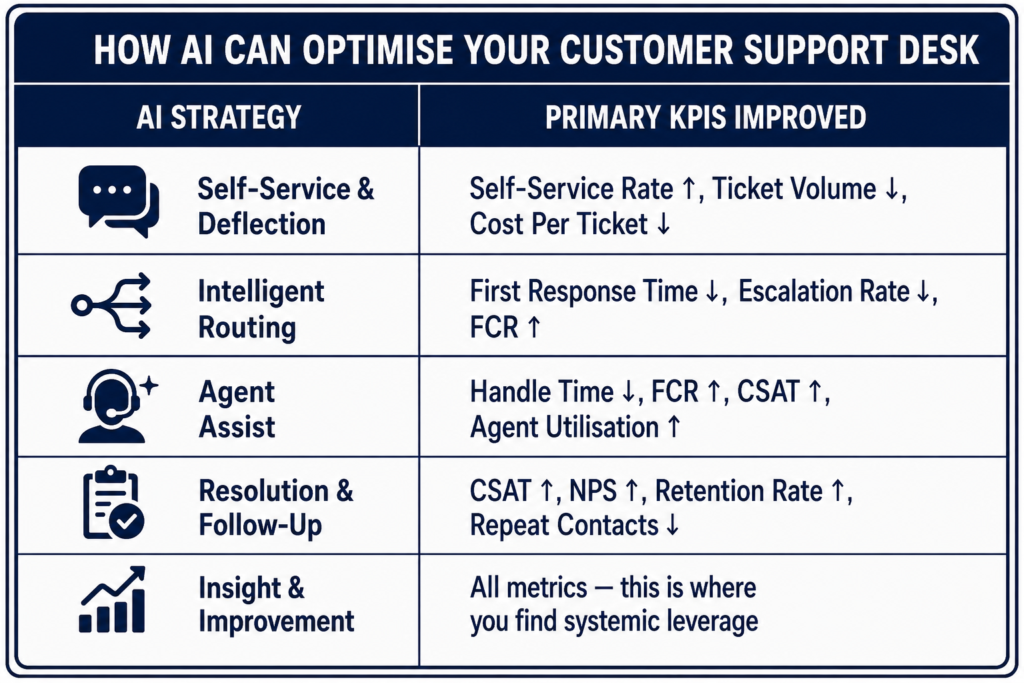
A Quick Reference: Which KPIs Does Each AI Strategy Impact?
Before You Start Optimising…
1. Don’t automate a broken process. If your current routing logic is a mess, AI will just route cases to the wrong place faster. If your knowledge base is outdated, a chatbot will confidently give customers the wrong answer. Fix the foundations before you layer on AI.
2. Don’t forget your people. AI should make your agents’ jobs better, not make them feel disposable. Involve your support team in the rollout. Ask them what’s painful. Let them test tools and give feedback. The teams that adopt AI most successfully are the ones where agents feel like partners in the change, not victims of it.
3. Don’t skip governance. AI tools — especially generative AI — need clear policies around data security, customer privacy, and quality control. Who approves the use of AI-generated responses? What data is being fed into the model? Who’s accountable if something goes wrong? Get these questions answered before you switch anything on.
Where to Start
If this all feels like a lot, here’s a simple starting point:
- Pick one stage of the funnel where you know there’s friction — self-service, routing, or agent productivity are usually the best places to begin.
- Audit your data. Is it clean enough for AI to work with? If not, start there.
- Start small. Pilot one AI tool with one team or one case type. Measure the impact. Learn what works.
- Iterate. AI gets better with feedback and data over time. Don’t expect perfection on day one. Expect progress.
Build the Skills to Lead This Kind of Change
Optimising a support desk with AI isn’t just a technology project. It’s a change management project, a business analysis project, and a people project — all at once.
If you want to be the person who leads this kind of work, you need more than technical knowledge. You need the ability to map processes, manage stakeholders, and drive adoption.
That’s exactly what we focus on at Supermums. Our training programmes build practical skills in business analysis, project management, and change management — alongside the technical platform skills that bring it all together.
Whether you’re looking to upskill in your current role or transition into a tech career, we can help you get there.
If this article has got you thinking about how you’d apply business analysis, agile project management, and change management to your improve a customer support desk then our Consultancy Skills Bootcamp is designed for exactly that.
It’s a practical, structured programme that teaches you the Consultancy Hat-Trick: Business Analysis, Agile Project Management, and Change Management. Whether you’re looking to step into consulting, a customer service manager wanting to drive AI adoption more effectively, or a career changer building your toolkit — this bootcamp gives you frameworks you can use immediately.
Alongside these skills we will walk through the sales process step by step and help you to explore the possibilities with AI.

Recent Posts






Subscribe To Our Weekly Top Tip Bulletin
Get Updates And Learn From The Best